
Most apps lose on users before they’ve ever interacted with the product.
Not because the product feels complex to use. Because wallet creation is considered as a separate onboarding step.
Push Wallet Kit removes this separation. By provisioning a real wallet the moment a user signs up.
Here’s how to enable it in your app in just 4 steps:
Authentication becomes identity provisioning
Usually onboarding requires two independent systems:
1️⃣ Authentication based (Google, email, socials)
2️⃣ Wallet creation and connection
It creates friction because users must create/import wallets before interacting with your app.
Push Chain combines these into a single identity layer. When a user logs in, Push provisions a wallet automatically. This wallet becomes the user’s persistent onchain identity.
Your app can now interact with the user immediately, without requiring manual wallet setup.
Step 1: Install Push Wallet Kit
npm install @pushprotocol/ui-kit
This will give your app access to authentication, wallet provisioning, and wallet access through one interface.
Step 2: Configure social login methods
Define which login methods your app should support:

This configuration enables authentication via Google and email.
When users authenticate using these methods, Universal Wallet automatically provisions a wallet for them.
Step 3: Initialize the Universal Wallet Provider
Wrap your app with the Universal Wallet Provider:
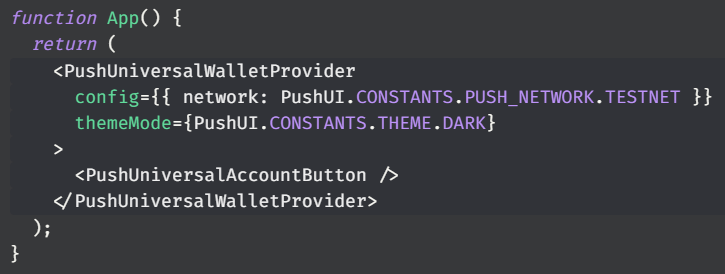
This activates the Universal Wallet layer. It handles:
• Authentication
• Wallet provisioning
• Secure key management
• Session persistence
• Wallet availability across your app
Your app now has an identity and wallet layer ready to onboard users.
Step 4: Enable additional social login providers
Push Wallet Kit also supports additional identity providers beyond Google and email.
You can enable providers listed below:
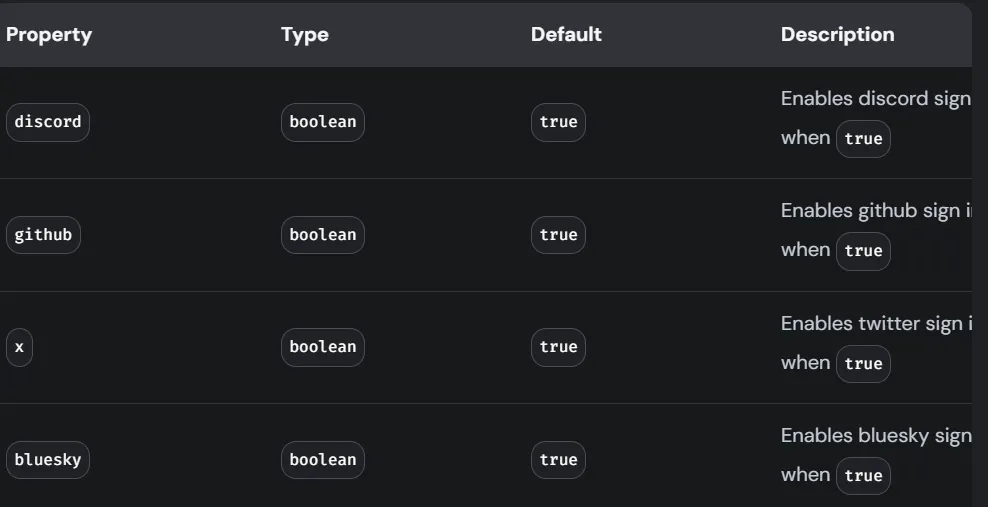
Each authentication method provisions the same Universal Wallet identity.
This means users can log in using familiar platforms, while your app still interacts with a consistent wallet layer.
What Universal Wallet enables
Once authenticated, the user immediately has a usable wallet. This wallet:
• Persists across sessions
• Can sign transactions
• Can interact with smart contracts
• Is accessible programmatically inside your app
No extensions/manual wallet setup required.
What you unlock as a builder
Users can log in and start using your app immediately. They can sign transactions, interact with contracts, and participate onchain, without creating or connecting a wallet manually.
Universal Wallet ensures wallet identity exists from the first interaction.
Takeaway:
Push Wallet Kit unifies authentication and wallet provisioning into a single layer.
Authentication creates identity → Identity provisions the wallet → Wallet enables execution
Sounds game-changing, right? Explore here